LangChain中Memory组件
临时记忆
如果想要封装历史记录,除了自行维护历史消息外,也可以借助LangChain内置的历史记录附加功能。 LangChain提供了History功能,帮助模型在有历史记忆的情况下回答。
- 基于RunnableWithMessageHistory在原有链的基础上创建带有历史记录功能的新链(新Runnable实例)
- 基于InMemoryChatMessageHistory为历史记录提供内存存储(临时用)
from langchain_core.runnables.history import RunnableWithMessageHistory

# 通过RunnableWithMessageHistory获取一个新的带有历史记录功能的chain
conversation_chain = RunnableWithMessageHistory(
    some_chain,           # 被附加历史消息的Runnable,通常是chain
    None,                 # 获取指定会话ID的历史会话的函数,比如下面的get_history
    input_messages_key="input",         # 声明用户输入消息在模板中的占位符
    history_messages_key="chat_history" # 声明历史消息在模板中的占位符
)
# 获取指定会话ID的历史会话记录函数
chat_history_store = {}     # 存放多个会话ID所对应的历史会话记录
# 函数传入为会话ID(字符串类型)
# 函数要求返回BaseChatMessageHistory的子类
# BaseChatMessageHistory类专用于存放某个会话的历史记录
# InMemoryChatMessageHistory是官方自带的基于内存存放历史记录的类
def get_history(session_id):
    if session_id not in chat_history_store:
        # 返回一个新的实例
        chat_history_store[session_id] = InMemoryChatMessageHistory()
    return chat_history_store[session_id]
from langchain_community.chat_models.tongyi import ChatTongyi
from langchain_core.chat_history import InMemoryChatMessageHistory
from langchain_core.output_parsers import StrOutputParser
from langchain_core.prompts import PromptTemplate,ChatPromptTemplate, MessagesPlaceholder
from langchain_core.runnables.history import RunnableWithMessageHistory

# 单纯打印一下提示词,还是原封不动的传递
def print_prompt(full_prompt):
    print("="*20, full_prompt.to_string(), "="*20)
    return full_prompt

model = ChatTongyi(model="qwen3-max")
# prompt = PromptTemplate.from_template(
#     "你需要根据对话历史回应用户问题。对话历史:{chat_history}。用户当前输入:{input}, 请给出回应"
# )
prompt = ChatPromptTemplate.from_messages(
    [
        ("system", "你需要根据对话历史回应用户问题。"),
        MessagesPlaceholder("chat_history"),
        ("human", "用户当前输入:{input}, 请给出回应")
    ]
)

base_chain = prompt | print_prompt | model | StrOutputParser()

chat_history_store = {}     # 存放多个会话ID所对应的历史会话记录

def get_history(session_id):
    if session_id not in chat_history_store:
        # 存入新的实例
        chat_history_store[session_id] = InMemoryChatMessageHistory()
    return chat_history_store[session_id]

# 通过RunnableWithMessageHistory获取一个新的带有历史记录功能的chain
conversation_chain = RunnableWithMessageHistory(
    base_chain,    # 被附加历史消息的Runnable,通常是chain
    get_history,   # 获取历史会话的函数
    input_messages_key="input",         # 声明用户输入消息在模板中的占位符
    history_messages_key="chat_history" # 声明历史消息在模板中的占位符
)
if __name__ == '__main__':
    # 如下固定格式,配置当前会话的ID
    session_config = {"configurable": {"session_id": "user_001"}}
    print(conversation_chain.invoke({"input": "小明有一只猫"}, session_config))
    print(conversation_chain.invoke({"input": "小刚有两只狗"}, session_config))
    print(conversation_chain.invoke({"input": "共有几只宠物?"}, session_config))
==================== System: 你需要根据对话历史回应用户问题。
Human: 用户当前输入:小明有一只猫, 请给出回应 ====================
哦,小明有一只猫啊!那这只猫是什么品种的?叫什么名字呢?
==================== System: 你需要根据对话历史回应用户问题。
Human: 小明有一只猫
AI: 哦,小明有一只猫啊!那这只猫是什么品种的?叫什么名字呢?
Human: 用户当前输入:小刚有两只狗, 请给出回应 ====================
原来小刚有两只狗呀!那他可真忙得过来~是大型犬还是小型犬呢?它们俩关系好吗?
==================== System: 你需要根据对话历史回应用户问题。
Human: 小明有一只猫
AI: 哦,小明有一只猫啊!那这只猫是什么品种的?叫什么名字呢?
Human: 小刚有两只狗
AI: 原来小刚有两只狗呀!那他可真忙得过来~是大型犬还是小型犬呢?它们俩关系好吗?
Human: 用户当前输入:共有几只宠物?, 请给出回应 ====================
小明有1只猫,小刚有2只狗,所以他们一共有 **3只宠物**。
RunnableWithMessageHistory是LangChain内Runnable接口的实现,主要用于:
- 创建一个带有历史记忆功能的Runnable实例(链)
它在创建的时候需要提供一个BaseChatMessageHistory的具体实现(用来存储历史消息)
- InMemoryChatMessageHistory可以实现在内存中存储历史
额外的,如果想要在invoke或stream执行链的同时,将提示词print出来,可以在链中加入自定义函数实现。
- 注意:函数的输入应原封不动返回出去,避免破坏原有业务,仅在return之前,print所需信息即可。
长期记忆
使用InMemoryChatMessageHistory仅可以在内存中临时存储会话记忆,一旦程序退出,则记忆丢失。我们可以自行实现一个基于Json格式和本地文件的会话数据保存。
FileChatMessageHistory类实现,核心思路:
- 基于文件存储会话记录,以session_id为文件名,不同session_id有不同文件存储消息
继承BaseChatMessageHistory实现如下3个方法:
- add_messages:同步模式,添加消息
- messages:同步模式,获取消息
- clear:同步模式,清除消息
官方在BaseChatMessageHistory类的注释中提供了一个基于文件存储的示例模板代码如下:
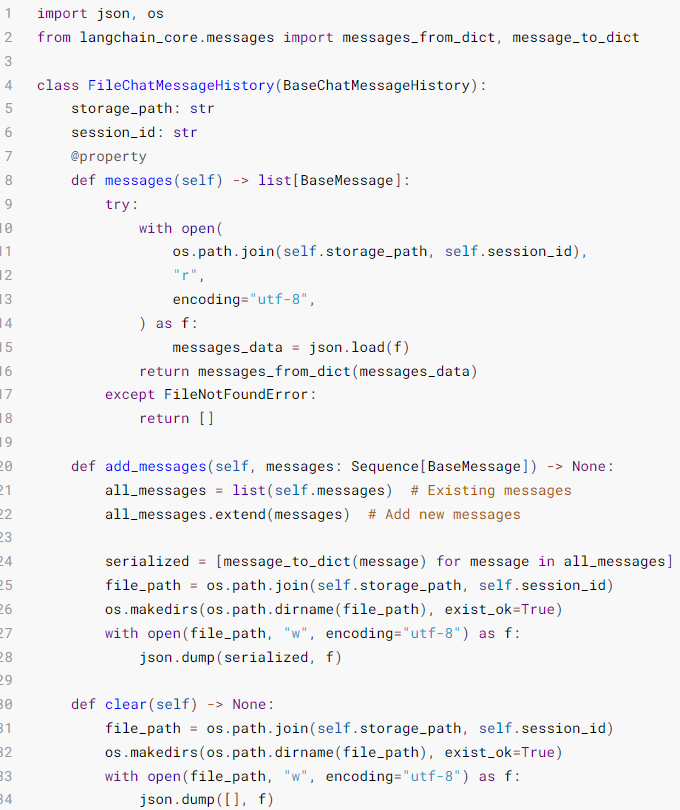
示例:
import json
import os
from langchain_core.messages import messages_from_dict, message_to_dict
from langchain_core.chat_history import BaseChatMessageHistory
from langchain_core.messages import BaseMessage

# messages_from_dict:单个消息对象(BaseMessage类实例)->字典
# message_to_dict:[字典、字典...]->[消息对象、消息对象...]
# AIMessage、HumanMessage、SystemMessage等都是BaseMessage的子类

class FileChatMessageHistory(BaseChatMessageHistory):
    def __init__(self, session_id, storage_path):
        self.session_id = session_id       # 会话id
        self.storage_path = storage_path   # 不同会话id的存储文件所在文件夹路径
        # 完整的存储文件路径
        self.file_path = os.path.join(self.storage_path, self.session_id)

        # 确保文件夹存在
        os.makedirs(os.path.dirname(self.file_path), exist_ok=True)

    @property  #装饰器必须有,把messages方法变成成员属性用
    def messages(self) -> list[BaseMessage]:    #返回值类型是BaseMessage的列表
        try:
            with open(
                os.path.join(self.storage_path, self.session_id),
                "r",
                encoding="utf-8",
            ) as f:
                messages_data = json.load(f)    #返回值都是字典
            return messages_from_dict(messages_data)
        except FileNotFoundError:
            return []

    def add_messages(self, messages) :
        all_messages = list(self.messages)  # 已有的消息列表
        all_messages.extend(messages)  # 添加新消息

        # 将数据同步导入本地文件,为了方便把BaseMessage对象转换成字典对象进行存储
        new_messages = [message_to_dict(message) for message in all_messages]

        with open(self.file_path, "w", encoding="utf-8") as f:
            json.dump(new_messages, f)

    def clear(self) -> None:
        with open(self.file_path, "w", encoding="utf-8") as f:
            json.dump([], f)
from langchain_core.prompts import ChatPromptTemplate, MessagesPlaceholder
from langchain_core.runnables.history import RunnableWithMessageHistory
from langchain_core.chat_history import BaseChatMessageHistory
from langchain_core.output_parsers import StrOutputParser
from langchain_core.messages import messages_from_dict, message_to_dict
from langchain_community.chat_models.tongyi import ChatTongyi
from typing import Sequence, List
import json

# -------------------------- 核心业务逻辑 -------------------------- #
# 1. 初始化通义千问模型
llm = ChatTongyi(model="qwen3-max")

# 2. 定义提示词模板(包含对话历史和用户输入)
prompt = ChatPromptTemplate.from_messages(
    [
        ("system", "你是一个贴心的助手,需要根据对话历史回应用户的问题。"),
        MessagesPlaceholder("chat_history"),
        ("human", "用户当前输入:{input}, 你的回应:")
    ]
)

# 3. 构建基础链(提示词 -> 模型 -> 输出解析)
base_chain = prompt | llm | StrOutputParser()

# 4. 定义会话历史获取函数(为每个会话创建独立的文件存储)
def get_message_history(session_id: str) -> BaseChatMessageHistory:
    """
    根据会话ID获取对应的对话历史存储实例
    param: session_id 会话唯一ID
    return: FileChatMessageHistory 实例
    """
    return FileChatMessageHistory(session_id=session_id, storage_path="./chat_history")

# 5. 包装带对话历史的链式调用
conversation_chain = RunnableWithMessageHistory(
    runnable=base_chain,
    get_session_history=get_message_history,  # 历史获取函数
    input_messages_key="input",  # 用户输入的参数名
    history_messages_key="chat_history",  # 对话历史的参数名
)

# -------------------------- 测试多轮对话 -------------------------- #
if __name__ == "__main__":
    # 会话配置(指定会话ID,用于区分不同用户/会话)
    session_config = {"configurable": {"session_id": "user_001"}}

    # 第一轮对话
    response1 = conversation_chain.invoke({"input": "小明有1只猫"}, config=session_config)
    print("第一轮:", response1)
    # 第二轮对话
    response2 = conversation_chain.invoke({"input": "小刚有2只狗"}, config=session_config)
    print("\n第二轮:", response2)

    # # 第三轮对话(依赖历史上下文)
    # response3 = conversation_chain.invoke({"input": "小明和小刚一共有几只宠物?"},
    # config=session_config
    # )
    # print("\n第三轮:", response3)
